An IT Ecosystem for Your Business: From a “Zoo” of Programs to One System
Which layers make up a company’s IT ecosystem, the principles for building one and where to start — using a trading company running 1C as the example.
2026-11-10
In short: an IT ecosystem means your company’s programs work with the same data and pass it to each other without people in the middle. A website order lands in accounting by itself, warehouse stock shows up on the website by itself, and the director sees one revenue figure, not three different ones.
In most companies IT grows historically: every new task gets its own purchased or custom-built program. A few years later you have a “zoo”: 1C, a website, a POS, Excel sheets, messengers — and people moving data between them by hand.
This article covers what an IT ecosystem is made of, the principles for building one and where to start. The running example is a trading company with 1C at the center of its records. The same principles apply to services and manufacturing.
How an ecosystem differs from a set of programs
The difference is not how many systems you have, but how they are connected:
- Data. In a set of programs, each one keeps its own version of customers, products and prices. In an ecosystem, each type of data has a single source and the rest read from it.
- Exchange. Instead of moving data by hand through Excel and messages — automatic exchange through APIs and integrations.
- Change. A new task doesn’t mean a new program or reworking everything; it means a new module plugged into data that already exists.
- Reporting. Instead of figures that don’t match between systems — one version of the truth for every department.
- Risk. Knowledge isn’t locked in a few employees or contractors: the architecture is documented, and access and backups are under control.
An ecosystem doesn’t mean “one big program for everything”. Most often it is a core system plus a few systems around it, each doing its own job well without duplicating its neighbors.
Signs you have a “zoo”
If three or more of these sound familiar, your IT is working for people worse than it could:
- The same data is entered twice. Website orders are retyped into 1C, and the 1C price list is uploaded to the website by hand.
- Numbers don’t match. Revenue in the POS, in 1C and in the director’s report differs, and part of every meeting goes to working out whose number is right.
- Key processes live in Excel and messengers. Sales plans, purchase requests and approvals sit in files and chats, outside the records.
- Every change feels risky. Any improvement breaks something elsewhere, because nobody knows all the connections.
- Everything depends on one person. When the developer or contractor leaves, the company no longer understands how its systems work.
- Nobody knows what happens in a failure. No one has checked whether the database can be restored from backup, or how long it would take.
Each of these carries direct costs: staff hours spent on manual work, errors in orders and stock, decisions based on wrong numbers. They are hard to see as a single budget line, but they repeat every day.
The layers of an ecosystem
It helps to look at a company’s IT as a set of layers. Each has its own job, and the layers talk to each other by clear rules.
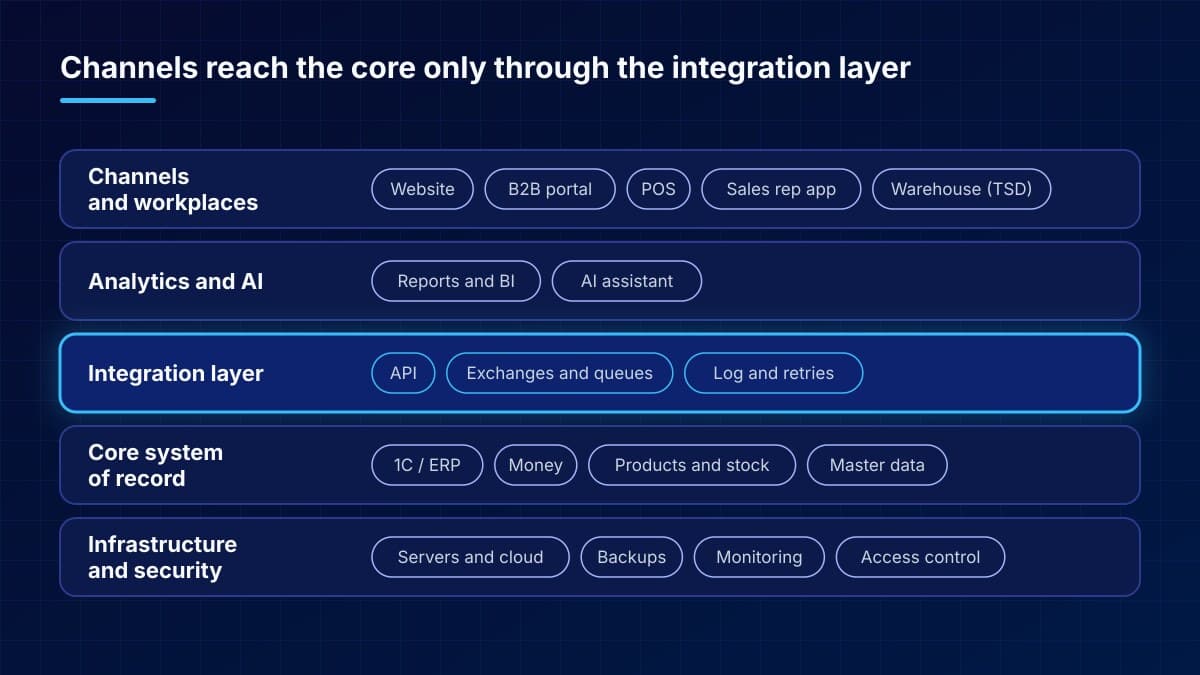
What each layer contains:
- Channels and workplaces — what employees and customers use: the website, a B2B portal, the POS, the sales rep app, warehouse terminals. They need a convenient interface, not full access to the records.
- Analytics and AI — management reports and an AI assistant that answers questions about the data. They read the data but are not its source.
- Integration layer — APIs and exchanges between systems, message queues, logging and retries on failure. This is what turns a set of programs into an ecosystem.
- Core system of record — 1C or another ERP: money, products, stock and core master data. The single source of truth for this data.
- Infrastructure and security — servers or cloud, backups, monitoring, accounts and permissions. The foundation everything else rests on.
Above all the layers sit support and development. Someone has to watch the exchanges, update the systems and own the architecture as a whole.
Example: a trading company with 1C
Take a typical trading company: wholesale through sales reps, a few stores and an online shop. Records are kept in 1C.
Before. Sales reps send orders by messenger, and an operator retypes them into 1C. Stock is uploaded to the website once a day from a file, so the website sometimes sells items that are already gone. The POS keeps its own product database, and prices in it are updated by hand. The director gets an Excel report assembled from three sources.
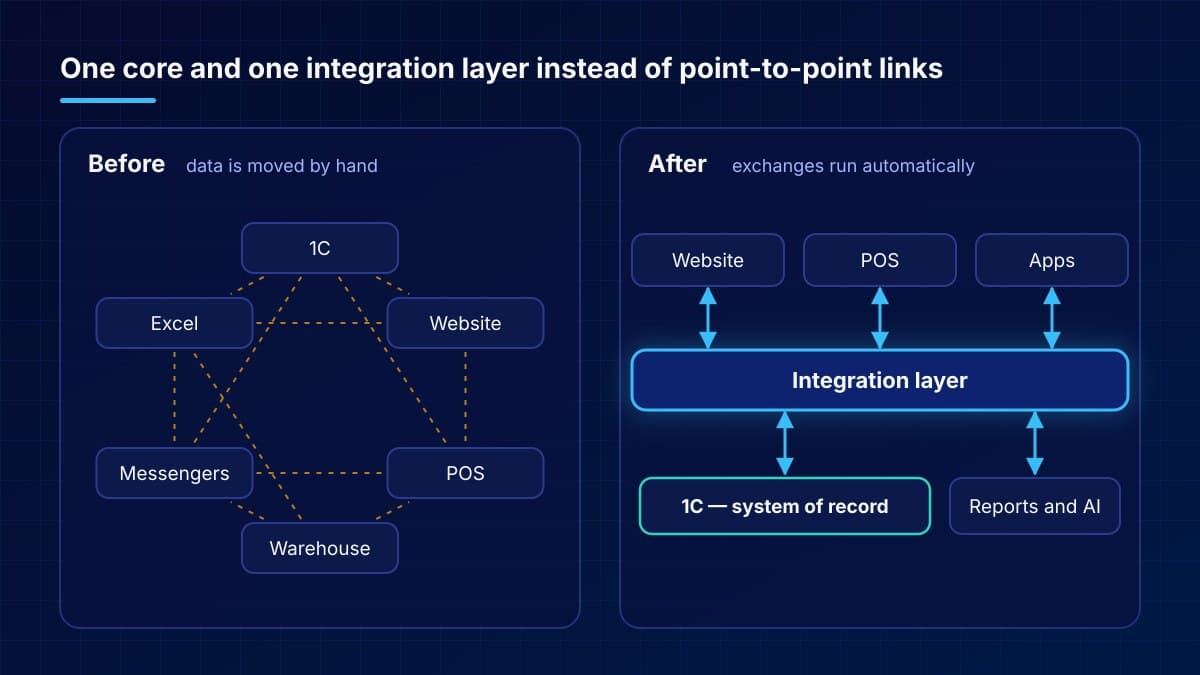
After. 1C stays the core system and the single owner of products, prices and stock. The website, the POS and the sales rep app get this data through the integration layer and send orders and sales back. The director looks at reports built on the same data, and quick questions are answered by an AI assistant connected to 1C.
Each of these steps is done separately and pays off right away. More detail in our articles on moving the POS into a dedicated application and a workspace for sales managers.
Building principles
A few rules separate a working ecosystem from an expensive pile of integrations. They don’t depend on which programs you use:
- One core system of record. Money, products and stock are calculated in one place. For many companies in Moldova that is 1C, and you don’t need to replace it — we covered this in our article on modular integration.
- Every master data set has one owner. Products, customers and prices are created and changed in one system; the others receive a copy. Otherwise duplicates and mismatches appear.
- An integration layer instead of point-to-point links. With direct links, their number grows faster than the number of systems: 6 systems can need up to 15 separate exchanges. An integration layer gives you one exchange point, logging and retries on failure.
- Open APIs and data export. Take on a new system only if it has an API and a way to get your data out. The same goes for AI: connecting Claude to 1C uses the open MCP standard.
- Security and resilience from day one. Role-based access, backups with tested restores, monitoring of servers and exchanges. Adding them later always costs more.
- A documented architecture with an owner. The map of systems and exchanges fits on one page, and a specific person or partner is responsible for it.
- Step-by-step development. Areas are connected one at a time, without stopping the business. Why we don’t recommend rewriting everything from scratch — in a separate article.
Where to start
An ecosystem isn’t built in one project but through a sequence of small steps. Each step should deliver a result you can check:
- Inventory. List your systems, data and the exchanges between them. Separately mark where people move data by hand and where numbers don’t match.
- Target map. Decide what the core system will be, which systems sit around it and who owns which data. The result is a one-page map that management can follow.
- Priorities. Start with the area that has the most manual work or errors and where the effect is easy to measure: staff hours, error counts, order processing time.
- Foundation. Set up the integration layer and put master data, access, backups and monitoring in order.
- Connect areas one at a time. Website, POS, manager app, reporting. Every launch has its own goal and a check of the result.
- Support and development. Watch the exchanges, keep systems updated and regularly compare the current map with the target one.
Common mistakes
What to avoid:
- Starting with the software instead of the process. First understand what data has to go where, then look for the tool.
- Changing everything at once. A “big bang” takes a long time to deliver anything and halts operations if something goes wrong.
- Wiring systems directly, however it works out. Each such link works until something changes, and failures get noticed through customer complaints.
- Not naming a data owner. The same customer ends up entered three times, and the website price doesn’t match the POS price.
- Saving on infrastructure. The more tightly systems are linked, the more a server outage or a lost database without a backup costs.
- Not documenting. An integration only its author understands becomes a problem the day the author leaves.
- Adding AI on top of messy data. An AI assistant answers from the data it has. If three systems hold three different revenue figures, it will quickly give you one of them — not necessarily the right one.
FAQ
Do we have to replace 1C?
Usually not. In most cases 1C stays the core system, and convenient workplaces, the website and reporting connect to it through integrations.
Is this only for large companies?
No. A small company simply has fewer systems, but the principles are the same: one core, one data owner, automatic exchanges and backups. The earlier they are in place, the cheaper growth becomes.
How long does it take?
An ecosystem is built continuously, not in a single project. The first measurable result comes with the first connected area. Timelines depend on the number of systems and the state of the data — we estimate them after the inventory.
Can we use cloud services?
Yes. What matters is that the service has an API for exchange and lets you export your data, and that personal data storage meets legal requirements.
Who should be responsible for this?
You need an architecture owner: an in-house IT manager or an external partner. For companies without their own IT department, IT outsourcing is a good fit.
You don’t need to replace 1C: modernizing processes through modular integration